1. Discovery & pairing
When SoftSled starts setup, it advertises itself on the local network over UPnP as a MediaCenterExtender device — exactly the broadcast a hardware extender makes. Media Center discovers it and the two sides run a multi-step handshake over SOAP:
- A trust agreement exchange (a one-time-password + HMAC key exchange) establishes that both ends agree on a shared secret derived from the setup key you typed in.
- A remoted-experience step delivers the connection details — including credentials for the dedicated
Mcxuser account the host creates for the extender.
This is where the certificate matters. Media Center authenticates extenders by certificate and normally checks a revocation list. SoftSled can generate its own extender certificate on the fly, signed by the SoftSled CA you installed on the host with the Host Setup tool. The patched Mcx2Prov.exe skips the CRL check that would otherwise reject a certificate with no published revocation list.
2. The RDP session
Once paired, SoftSled connects to the host's Remote Desktop server (on Media Center's dedicated port 3390) as the Mcx user, using Standard RDP Security — the RC4-based scheme embedded extenders use, rather than TLS. But this is no ordinary remote desktop: the real action happens on a set of named virtual channels that ride alongside the display.
| Channel | Job |
|---|---|
McxSess | Session lifecycle — start, heartbeat, "shell is active", disconnect. |
devcaps | Reports the extender's device capabilities to the host's shell. |
avctrl | Audio/video control — open media, play, pause, stop, seek, volume, position. |
splash | Remote-rendering graphics via the MS-RRSP2 Protocol, just like the Xbox 360. |
3. Speaking DSLR
Each virtual channel (with the exception of splash) carries a Microsoft binary protocol called MS-DSLR (Device Services Lightweight Remoting). Every message is a framed, big-endian, nested structure identifying a service, a function and a request handle. On top of DSLR sit several sub-protocols, and SoftSled implements a handler for each:
- MS-DSPA — device capability properties: a few dozen flags telling the host what the extender can do, which gate everything from HD video to the rendering mode.
- MS-DSMN — session management on
McxSess(heartbeats, shell state). - MS-DMCT — media transport: this is what turns a "play this" request into an RTSP connection and drives play / pause / stop / seek.
Getting these flags and framing byte-exact is what enables ehshell.exe (the Media Center shell) to handle the session as a genuine extender and to keep the session alive.
4. A patched FreeRDP transport
Early SoftSled builds drove the session through Microsoft's RDP ActiveX control, but that black box truncated virtual-channel data and — crucially — never exposed how Media Center actually paints its interface. SoftSled now uses a patched build of FreeRDP (the open-source RDP client) wrapped as a native shim and called from the app. That gave the project access to the raw, decrypted RDP stream, and with it the answer to a long-standing mystery.
Cracking "super blt"
Media Center doesn't render its shell as ordinary drawing orders. Instead it ships the interface as a stream of fast-path bitmap updates at 32 bits per pixel with a proprietary compression — a format outside the published RDP specification, carrying a per-pixel alpha channel. That alpha is the secret behind Media Center's translucent overlays while in GDI (Non-remote rendering) mode. SoftSled's shim decodes this framebuffer into a standard BGRA32 surface, complete with its alpha, ready to be composited.
5. Audio & video over RTSP
The RDP channel handles the interface, but the heavy media doesn't travel over RDP. When you start playback, the avctrl handler receives an RTSP URL and SoftSled opens a separate streaming session to the host. Media Center delivers audio and video using WMRTP (the Windows Media RTP payload format), which SoftSled depacketises into clean media frames:
- Video: H.264 and MPEG-2, decoded with FFmpeg and presented on a GPU surface for smooth, real-time playback.
- Audio: PCM and MP3, rendered through the system audio device, which also acts as the master clock.
Keeping it in sync
Live TV and recordings arrive in bursts, with independent timing clocks for audio and video. SoftSled slaves the video to the audio's real playback clock and paces each decoded frame to a presentation schedule, using cues from the stream's timing fields and RTCP reports to lock the two together. A small jitter buffer absorbs the bursty delivery so playback stays smooth.
6. Compositing it all together
Finally, two layers are combined on the GPU: the video plane underneath, positioned and scaled to match the picture-in-picture region the host requests, and the alpha-bearing UI plane on top. The WPF compositor blends them per-pixel, and the finished frame — translucent Media Center UI floating over live video — lands on your screen. Keyboard and mouse input travel the other way, back over the RDP session, so you drive the host shell as if you were sitting at it.
Input isn't limited to a keyboard and mouse. SoftSled also accepts a standard Media Center RC6 remote: it reads the raw HID button presses delivered by an MCE infrared receiver plugged into the extender PC, maps each one to the matching Media Center remote command, and forwards it to the host over the same channel — so navigation, transport and the green Start button all work just like they do on a hardware extender.
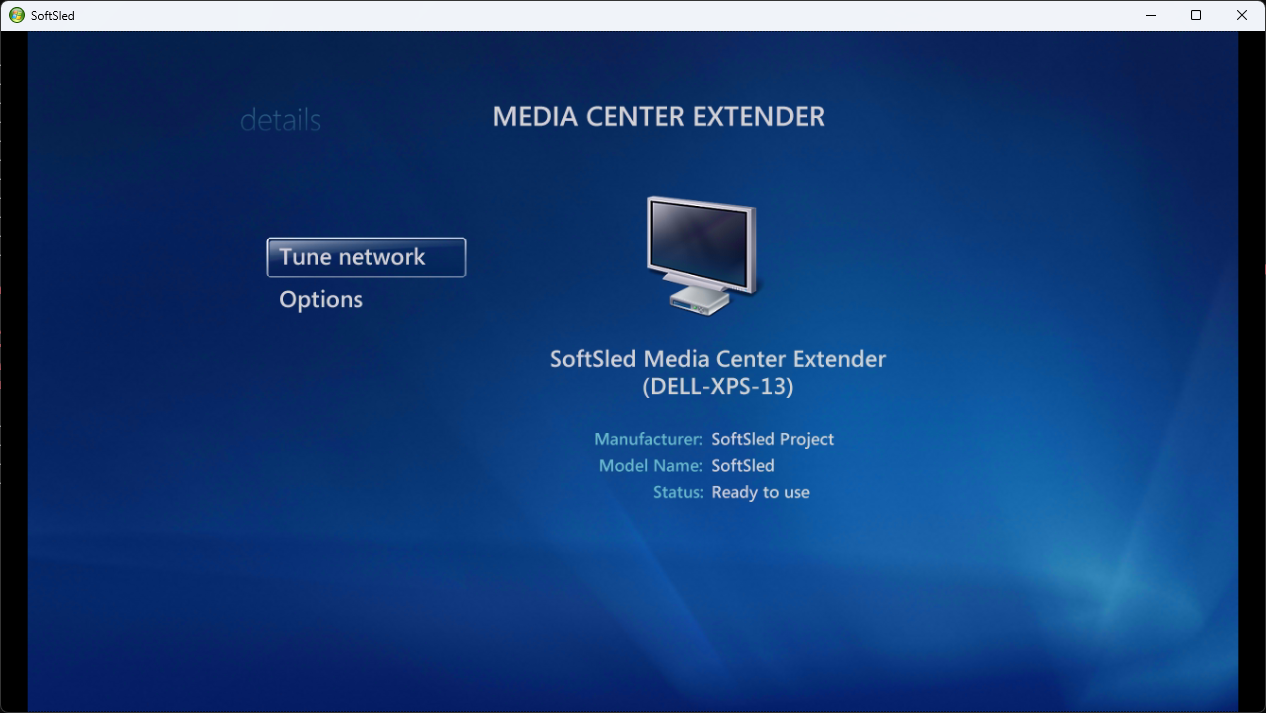
The end result: the genuine Media Center shell, composited and interactive.