Features

SoftSled aims to be a faithful, nearly fully-featured Media Center Extender — not a screen-share. It speaks the same protocols a hardware extender does, so Media Center treats it as the real thing.

🖥️

The real WMC shell

The genuine Media Center 10-foot interface — menus, animations and all — rendered on your extender PC and driven with the keyboard or a remote.

📺

Live & recorded TV

Watch live TV from the host's tuners and play back recorded TV, streamed over RTSP straight from Media Center.

🎬

Video playback

Hardware-accelerated video decode for both H.264 and MPEG-2 content delivered by the host.

🎵

Music & audio

Audio streaming with MP3 and PCM playback, plus proper volume and mute control synced with the host.

🖼️

Pictures

Browse and view your photo library through the Media Center pictures experience.

🔊

Interface sounds

The signature Media Center navigation and UI sounds are forwarded and played, so the shell feels exactly like the real thing.

🎛️

MCE remote control

Point a standard Media Center RC6 remote at an MCE infrared receiver on the extender PC and drive the shell with it. Button presses are translated to Media Center commands and forwarded to the host — the green Start button even launches the session.

🪟

Transparent UI over video

Media Center's translucent overlays — program info, transport bars — are composited over full-motion video with real per-pixel alpha.

🔐

On-the-fly pairing

SoftSled generates its own extender certificate during setup, so there's no manual certificate wrangling to get paired.

🛠️

One-click host setup

A small admin tool prepares the host PC in seconds — and fully reverses every change if you decide.
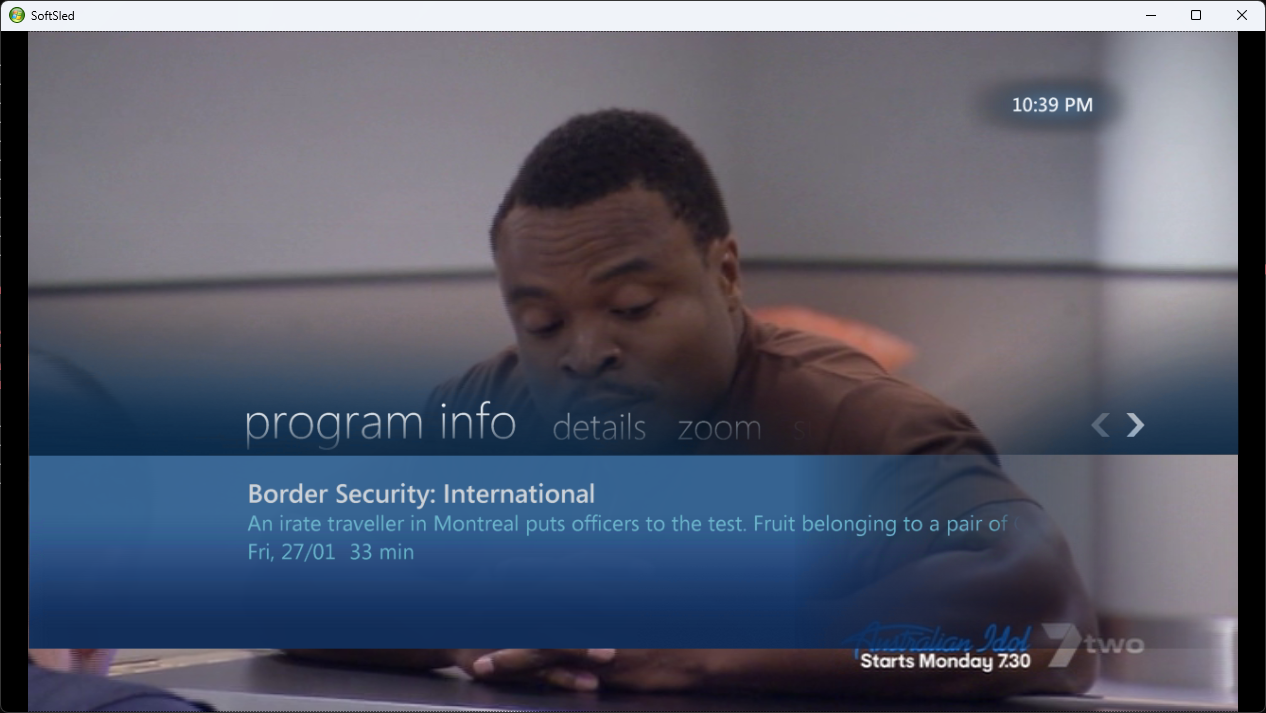
Translucency, done properly

A regular remote-desktop session gives you a flat, opaque picture. SoftSled goes further: it decodes the host's UI as an alpha-bearing layer and composites it on top of the video plane on the GPU. The result is Media Center's trademark glassy overlays sitting correctly over live and recorded video — picture-in-picture, transport controls and program info included.

See how it's done →
Translucent program info overlay over live TV

Capability matrix

Where things stand today. SoftSled is an active reverse-engineering project, so this evolves — check GitHub for the latest.

CapabilityStatus
Full pairing & configuration (with certificate generation)Working
Device Services Lightweight Remoting (MS-DSLR) protocolWorking
Device capability & session negotiation (MS-DSPA / MS-DSMN)Working
Media control (MS-DMCT) — play / pause / stop / seekWorking
RDP bitmap & remote-rendering shell displayWorking
Interface soundsWorking
RC6 / MCE / custom remote-control forwardingWorking
Audio playback — MP3, PCMWorking
Video playback — MPEG-2, H.264Working
Audio / video sync engineIn progress
Client-side media transport controlsPlanned
DRM-protected playbackUnlikely

Rendering modes: GDI vs RUI

SoftSled can draw the Media Center interface two different ways. In GDI mode (RDP rendering) the host paints the UI and streams it to the extender as compressed bitmaps. In RUI mode (remote rendering, the same MS-RRSP2 scheme the Xbox 360 used) the host sends drawing instructions and the extender renders them locally — lighter on the network and far smoother, but it needs a low-latency link. The first-run wizard picks for you based on your connection: wired enables RUI, Wi-Fi falls back to GDI.

CapabilityGDI RDP renderingRUI remote rendering
Where the UI is drawnOn the host, streamed as bitmapsOn the extender, from instructions
UI displayYesYes
Transparent UI over videoYesYes
UI soundsYesYes
UI frame rate~15–20 fpsUp to 60 fps
Video playbackYesYes
A/V syncIn progressIn progress
Video picture-in-pictureYesYes
Video zoomYesNo
WMC RC6 remoteYesYes
Custom remote mappingYesYes
Network bandwidthHigher (streamed images)Lower (drawing commands)
Connection toleranceWorks over Wi-FiWired / low-latency recommended

Video zoom in RUI mode is an open question — we haven't yet worked out how Media Center communicates the zoom change to a remote-rendered extender, so SoftSled has nothing to act on.

Want the technical story?

From UPnP discovery to a patched FreeRDP transport and a hand-written RTSP A/V pipeline — it's a fun rabbit hole.